Lifechanger Part 1: Project Overview & Impact
Executive summary of the Lifechanger project. AI-powered Goal achievement, offline-first architecture, and senior engineering leadership.

TL;DR
Lifechanger is a cross-platform, collaborative personal assistant app focused on helping users gain clarity on, define and then achieve their life goals. The app’s UI is centered around task manager-like views and features AI-powered goals, bespoke calendar solutions, an inspirational slideshow, and much more.
As Frontend Developer at Adaptabi, and part of a very small team at the time, I was in charge of the entire client-side application development. Highlights include:
- React on the frontend
- Bundling for web and mobile using webpack and Apache Cordova
- Offline-first powered by IBM’s CouchDB/PouchDB combo
- Push notifications delivered by Firebase
- Real-time editable slideshow powered by CSS animations using GSAP
- High-performance local state management leveraging Redux and RxJS
Engineering Deep Dives
This project presented unique engineering challenges that required system-level thinking. I’ve detailed the technical solutions in two dedicated articles:
- Part 2: Offline-First Architecture & State Management
- Topics: CouchDB/PouchDB Sync, Redux + RxJS, Web Workers, Cross-platform bundling.
- Part 3: High-Performance UX Engineering
- Topics: Custom Gesture Handling, GSAP Animations, DOM-based Drag & Drop Manager.
Introduction
Lifechanger is meant to be just that — a life-changing application. And it would change your life because:
- it features AI-powered Goals that help you keep your eyes on the prize
- it’s a task manager with a smart Calendar that keeps you organized
- its highly collaborative nature keeps you in touch with family and friends
- the Daily Inspiration slideshow helps you kickstart your days with energy
- the Mindset center helps you meditate
- the Habits tracker helps you get rid of bad habits by building good ones
- the Daily Journal helps you close your day with meaningful insights
If you’d like a video presentation, there’s one right on the product page: https://lifechanger.com/the-app/
It’s a big project, with a long development history and several pivots and UX overhauls. It honed many of my current skills and provided me with experience in managing complexity, software maintenance, systems design, UI responsiveness, React performance, state management, UX/UI design, and much more.
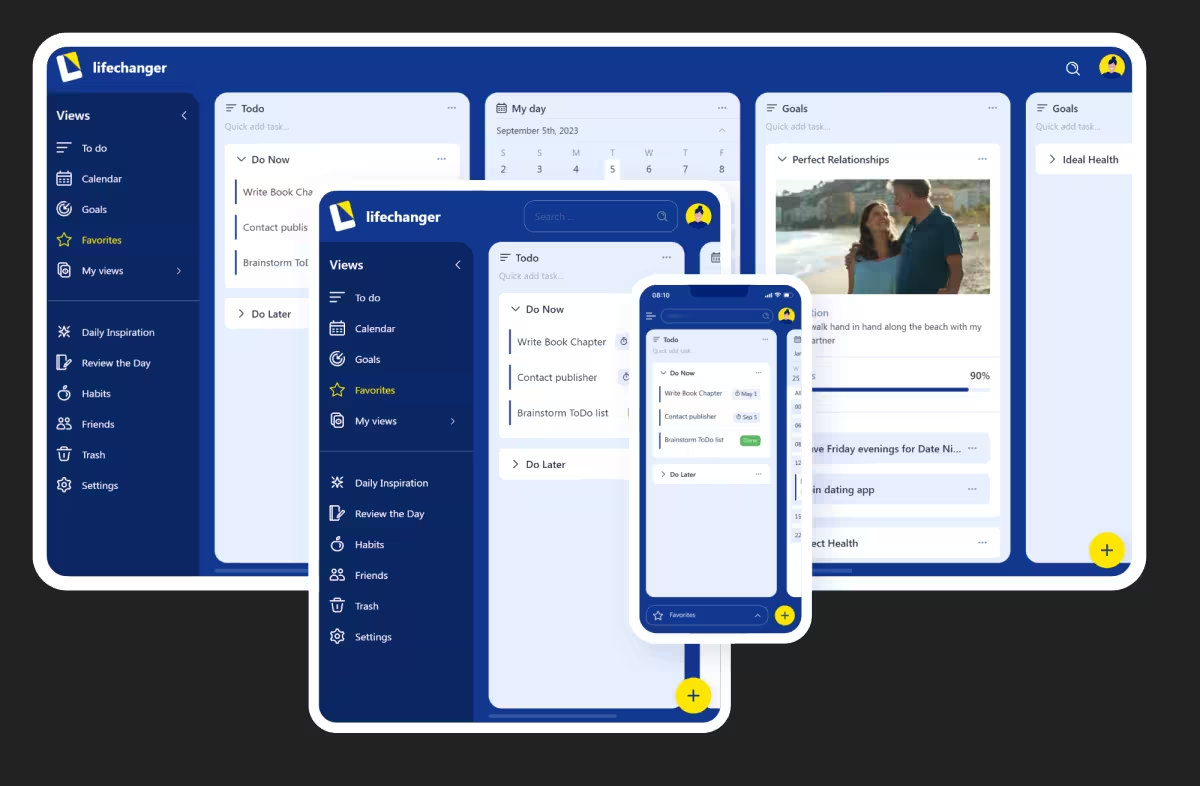 The Lifechanger app on multiple devices
Timeline and Project phases
My part in Lifechanger’s development ran from its inception in mid‑2018 until early 2024. I was the sole frontend developer on the project, within a small team in Adaptabi (1 frontend, 1 backend, 1 QA), effectively acting as Senior Frontend Engineer & UX lead.
On the product side I worked directly with the client, the owners of Lifechanger. I would receive raw requirements, analyse them, challenge incoherent flows, propose alternatives, and then design and implement the final UX/UI. On anything related to the client-facing application, I was the main decision-maker.
Business pivots and UX impact
The product went through three distinct phases:
2018–2020: Power users after coaching sessions
The original target group were “ready‑trained” power users: people who had gone through an intensive life coaching program and would now rely on Lifechanger as their central tool. The UX assumed high motivation and a willingness to manage a lot of structure and configuration.2020–early 2022: Targeting other life coaching professionals
When the initial business launch failed amidst Covid, the client pivoted towards selling the platform to other life coaches. This led to new requirements around bespoke application branding, including custom item and list types, custom fields, custom colors, configuration seeding, and more.From early 2022: General public
When the B2B angle also failed, the target switched again, this time to the general public, with no assumed prior knowledge of the product’s special concepts. This invalidated large parts of the original UX, which had been designed for trained, motivated power users. Many of the advanced flows were now overwhelming.
To adapt, we stripped down several features, simplified flows, and redesigned all forms and main screens. For the last UI transformation we hired a professional designer for a few months. I collaborated closely with them, translating their designs into a feasible UI, pointing out constraints, and ensuring that the final result stayed functional and maintainable. Visually, it was a massive improvement:
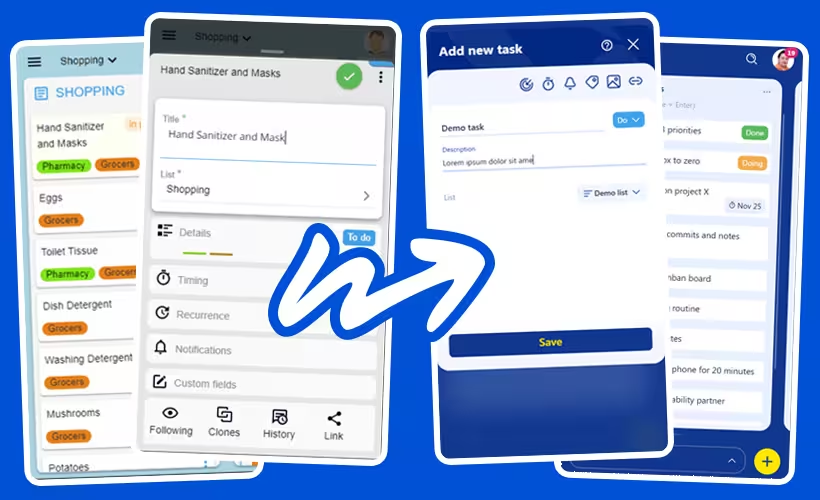 Lifechanger app UI evolution
Constraints in practice
The main constraints throughout the project were:
Budget and team size– We were only two developers and one tester. There was some room for experiments but they costed time.Constantly evolving specifications– The client iterated on concepts, flows, and details. Changes would sometimes create conflicting user journeys, so I had to push back, redesign flows, and/or clarify what would actually work in the product.Performance under heavy UI load– The client wanted to fit a lot of information on single screens: tens of lists with potentially hundreds of tasks each, including nested lists, Eisenhower matrices and calendar views. Keeping this responsive on both desktop and mobile devices required deliberate architecture, careful state management, and dedicated performance work.
Within these constraints, I was trusted to decide what was technically feasible, where to simplify, and how to present complex functionality in a way that still felt approachable to the end users.
Goal planning and early AI assistance
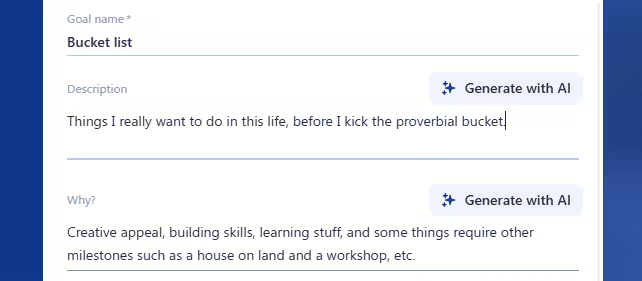 Goal form with AI buttons
Goals in Lifechanger started as special lists with a guided framework, not just a title and freeform tasks. Creating a goal walked users through structured prompts:
- What is the goal?
- Why does it matter?
- Why do it now?
- What is the current starting state?
After these, users defined Milestones. Each milestone behaved like a constrained list:
- Reorderable only within the same goal (no cross‑goal moves)
- Non‑movable out of the goal (integrity constraint)
- Assigned a configurable
weight(importance multiplier)
Tasks retained a status life‑cycle (Todo, In Progress, Done). On the server, a completion score computation:
- Aggregated all tasks across the goal’s milestone sublists
- Added them using
taskWeight * milestoneWeight, wheretaskWeight = 1andmilestoneWeightis the one configured by the user - Calculated an absolute completed (status
Done) vs total value, which the UI could present as-is or as a percentage value (configurable, of course) - Handled tasks moved temporarily to calendar planning lists without losing their linkage for scoring
A goal image banner reinforced focus: frequent visual exposure to the desired outcome. When its default checkbox is left enabled, the goal automatically becomes a slide in the Daily Inspiration slideshow — reusing the banner image as the background and the goal title as overlay text. The slideshow settings then expose a dedicated section for adjusting that slide’s text colour, size, and opacity. This tight integration keeps the goal visually present in a daily ritual, nudging consistent progress without extra user effort.
AI assistance (2023 integration)
In 2023, we added early AI support—modest by today’s standards, but impactful back then:
Generate with AIbuttons next to the initial goal question fields- Each button triggered a tailored prompt (prompt‑engineered templates) combining:
- Goal title
- Any user‑entered partial answers
- Intent (e.g. derive motivation statement, clarify starting state)
- Returned suggestions prefilled the field; users could then freely edit the fields to either accept, edit, or discard AI content.
This helped users overcome blank‑page friction and articulate motivation with more emotional clarity.
Division of work and UX design
- Backend & AI orchestration (prompt assembly, calling the model, scoring logic): implemented by the backend engineer
- Frontend:
- Designed the guided flow and progressive disclosure (questions first, milestones second)
- Implemented the Goal form UI, AI action buttons, optimistic insertion of generated text, and fallback handling if generation failed or timed out
- Ensured progress visuals (bar modes, weighted calculations) updated consistently when tasks moved or statuses changed
Notable design points
- Weighted milestone model encouraged prioritization (one high‑impact milestone could outweigh multiple trivial ones)
- Strict movement constraints for milestones preserved structural meaning (users couldn’t accidentally “detach” a milestone)
- AI confined to
assistive suggestions, never auto‑creating tasks—maintaining user agency - Progress display mode toggle (absolute vs percentage) addressed differing motivational preferences
What this project contributed to my senior frontend expertise
Lifechanger compressed years of varied frontend challenges into one sustained journey. The combination of offline‑first data flows, dense interactive UI, accessibility needs, and repeated product pivots required system‑level thinking rather than feature hacking. Key takeaways:
- End‑to‑end client-side
ownership: sole responsibility for UI architecture, performance, and UX. - Architecture under
change: kept the codebase adaptable through multiple audience pivots without collapse or paralysis. Offline‑first engineering: co‑designed replication, conflict handling, recurrence + timezone normalization, and calendar precomputation (web worker caching).Performance strategy: DOM‑level DnD manager,opacity‑only animations, GSAP timeline scrubbing, selective preloading, and background cache generation.Interaction design depth: custom tap vs drag ergonomics, adjustable thresholds, auto‑panning with eased scrolling, meditation slideshow scrubbing.Cross‑platform delivery: unified React + Cordova build, handling mobile constraints (audio API limits, touch event nuances) while retaining desktop parity.Resilience to ambiguity: translated raw, shifting requirements into coherent flows; pushed back where interaction conflicts arose.Collaboration & synthesis: integrated designer input, backend constraints, user feedback, and technical feasibility into stable UX.Abstraction mindset: reusable DnD manager and event layer instead of scattering ad‑hoc handlers; clear separation between raw data, derived caches, and view responsiveness.Tradeoff discipline: explicit choices (full image preload for slideshow vs blank flashes;opacityfades vs heavier transforms; timeline scrubbing vs per‑slide re-renders).Reliability focus: engineered for thousands of daily active users with large boards and heavy recurrence without regressions or degraded interaction quality.
In sum, Lifechanger showcases senior competencies: shaping architecture under evolving constraints, engineering performance for worst‑case scenarios, designing forgiving and accessible interactions, and aligning product intent with technical reality — all while maintaining velocity over multiple multi‑year pivots.
Thank you for reading!
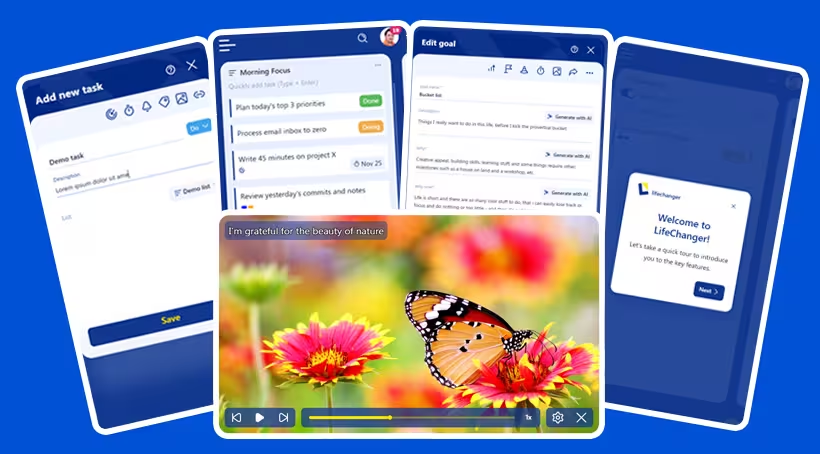 Lifechanger: Extraordinary is Achievable